
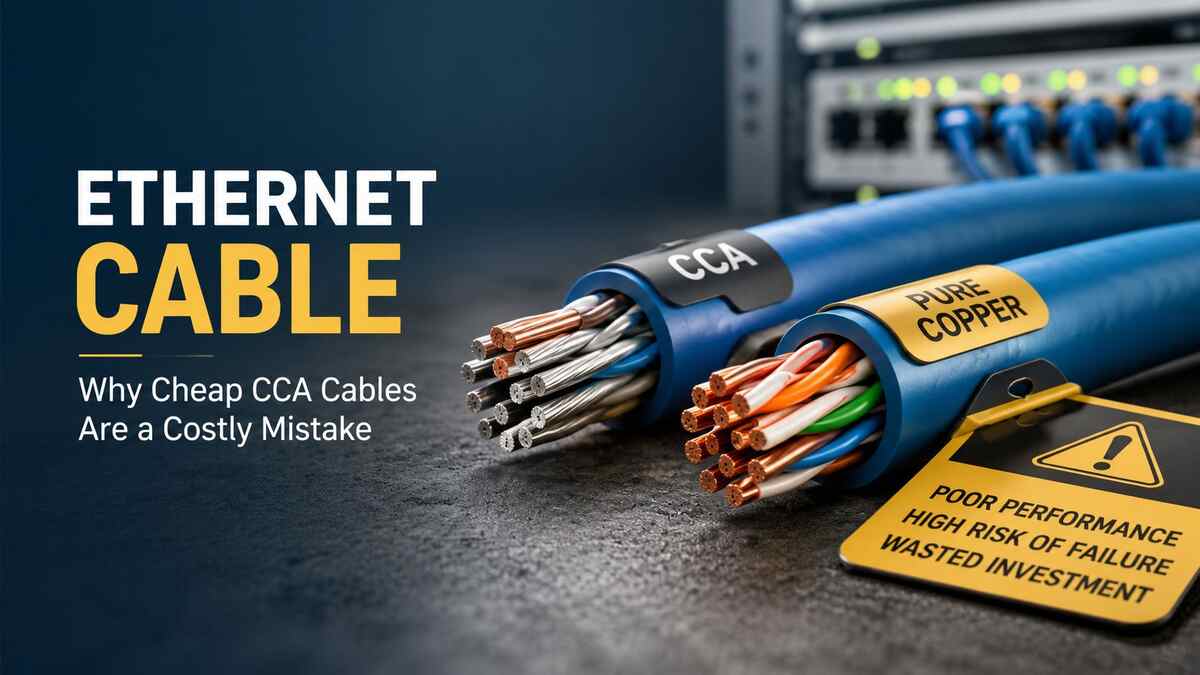
You plug in your Ethernet cable expecting smooth streaming, fast downloads, and zero lag during video calls. Most of the time it works fine at first. But after a few months, your connection starts dropping, speeds slow down, or the cable itself feels stiff and ready to snap. If you bought one of those super-cheap options online, there is a good chance you got a CCA cable instead of real copper. These cables look like a bargain, but they end up costing you time, frustration, and extra money when they fail.
An Ethernet cable carries your internet signal from the router to your computer, TV, or game console. It sounds simple, yet the material inside makes a huge difference in how well it performs day after day. Cheap CCA cables cut corners on that material, and the problems show up faster than most people expect. In this guide, I will walk you through exactly why these cables cause trouble, what happens in real life, and how you can pick something that actually lasts.
How Ethernet Cables Work in Everyday Setups
Ethernet cables come in different categories like Cat5e, Cat6, and Cat6a. Each one handles certain speeds and distances. Cat5e manages up to one gigabit per second over 100 meters. Cat6 pushes higher speeds and reduces interference better. The cable has eight wires twisted together in pairs inside a plastic jacket. Those wires carry the electrical signals that become your data.
The twisting helps cancel out noise from nearby power lines or other cables. The outer jacket protects everything from bends and spills. But none of that matters much if the wires themselves are made from the wrong stuff. That is where most people get caught out when they shop on price alone.
Ethernet Cable Materials: CCA vs Pure Copper
The big split happens with the conductor material. CCA stands for copper clad aluminum. Manufacturers take a thin aluminum wire and coat it with a layer of copper. It looks and feels like copper from the outside, so sellers can advertise it as “copper cable” without lying outright. Pure copper cables use solid copper or stranded copper all the way through.
Aluminum costs way less than copper, so CCA cables sell for half the price or even less. Factories can produce them quickly and ship them in huge volumes. You see them everywhere on discount sites and in bulk packs. The problem is aluminum conducts electricity about 60 percent as well as copper. That gap creates issues right from the start, and they get worse over time.
Pure copper moves signals with less resistance. The cable stays flexible, handles heat better, and keeps working year after year. You pay more upfront, but you avoid the headaches that come with the cheap stuff.
Why CCA Cables Lose Speed and Reliability Fast
Resistance is the main enemy here. Because aluminum resists electricity more, the signal gets weaker as it travels down the cable. On short runs of ten or twenty feet, you might not notice anything. Once you go past fifty feet, the difference shows up clearly. Your one-gigabit connection might drop to 300 or 400 megabits. Online games lag. 4K videos buffer. File transfers take twice as long.
Twisted pairs inside CCA cables also suffer more from crosstalk. Signals bleed between wires and create errors. Your network device has to keep resending data, which slows everything down. In a busy house with multiple devices streaming at once, the whole network feels sluggish.
I have seen this in home offices where someone ran a 75-foot CCA cable to a desk in the basement. Downloads that should finish in minutes dragged on for half an hour. Switching to pure copper fixed it immediately. The same pattern repeats in small businesses that try to save money on wiring.
Heat Buildup and Safety Risks You Cannot Ignore
Power over Ethernet (PoE) sends electricity through the same cable that carries data. Security cameras, Wi-Fi access points, and some phones use this feature. CCA cables handle that extra current poorly. Aluminum heats up faster than copper and does not spread the heat away as well.
The thin copper coating can wear off at connection points over time. When that happens, the aluminum underneath oxidizes and creates higher resistance spots. Heat builds up even more. In the worst cases, this has caused cables to melt or start small fires inside walls. Insurance companies have started asking about cable types after claims like these.
Even without PoE, regular use in warm rooms makes CCA cables brittle. The aluminum core expands and contracts differently than the copper layer, so tiny cracks form. One day the cable just stops working completely, often right in the middle of an important meeting or game.
Long-Term Costs That Add Up Quickly
A $5 CCA cable looks like a steal next to a $15 or $20 pure copper one. But think about what happens when it fails after six months. You buy another one. Then another. You spend time troubleshooting why the internet keeps cutting out. If you run the cable through walls or ceilings, replacing it means tearing open drywall and paying someone to fix it.
In an office with twenty desks, those small problems multiply. Downtime costs money in lost productivity. Employees get frustrated. IT staff waste hours swapping cables instead of working on bigger projects. I know a small marketing agency that replaced every CCA cable in their building after six months. The total bill came to three times what quality cables would have cost from the start.
Pure copper cables often last five to ten years without any drop in performance. You set it and forget it. That peace of mind alone makes the higher price worth it for most people.
How to Spot CCA Cables Before You Buy
Sellers have gotten clever. Packages say “copper network cable” or “high-speed Ethernet” without mentioning the core material. Here is what to look for instead.
Check the description for the exact words “pure copper,” “100% copper,” or “bare copper.” If it says CCA, copper clad aluminum, or nothing at all, walk away. Good listings mention the conductor type clearly.
Look at the jacket markings printed every few feet. Quality cables list the category, fire rating like CM or CMR, and sometimes the conductor material. Cheap ones have blurry printing or skip details.
Bend a sample if the store lets you. CCA feels stiffer and springs back less. Pure copper bends smoothly and stays where you put it. You can also ask for the AWG rating. Thicker wires like 23 AWG or 24 AWG usually mean better copper content.
Online, read recent reviews that mention “worked great for six months then died” or “PoE camera keeps disconnecting.” Those patterns point to CCA. Stick with brands that show third-party test results or list ETL or UL certifications for the full cable, not just the jacket.
What Makes a Quality Ethernet Cable Worth Buying
A good Ethernet cable uses solid copper conductors in the right gauge for its category. The twists stay tight and even along the whole length. The jacket resists oil, sunlight, and normal wear. Connectors fit snugly and use gold-plated contacts that resist corrosion.
For most homes and small offices, Cat6 pure copper handles everything you need right now and leaves room for faster internet later. If you run cable longer than 100 feet or want 10-gigabit speeds, step up to Cat6a. Outdoor runs need cables rated for direct burial or UV protection.
You do not need the most expensive option on the shelf. A few reliable brands focus on honest specs and skip the fancy marketing. Check the return policy too. If the seller stands behind the product, they usually sell better cables.
Smart Ways to Install and Maintain Your Cables
Even the best cable fails if you install it wrong. Keep bends gentle—no tighter than four times the cable diameter. Avoid running next to power lines for long stretches. Use cable ties loosely so you do not crush the wires inside.
Label both ends so you know which cable goes where months later. In walls, use conduit if you ever want to pull a new cable without tearing things apart. For outdoor runs, bury deep enough or use UV-rated jackets and waterproof connectors.
Check connections every year or two. Dust and oxidation can build up. A quick wipe with a dry cloth and reseating the plug fixes many small glitches. If you notice slowdowns, test with a different cable first before blaming your router or internet provider.
Common Mistakes People Make with Ethernet Cables
Many folks assume all black cables are the same. They grab whatever is cheapest and run it behind furniture where it gets stepped on or pinched. Others mix CCA and pure copper in the same network, which creates weak spots.
Some believe Wi-Fi makes wired cables old-fashioned. Yet wired connections stay faster and more stable, especially for smart TVs, game consoles, and desktop computers. Wireless works great for phones and tablets, but a solid cable still wins for heavy lifting.
Another mistake is buying the longest cable you might ever need instead of the right length. Extra coils create signal reflections and heat. Measure first, then add a few feet for easy routing.
Making the Switch Without Breaking the Bank
Start with the cables you use most. The one to your main computer or the TV in the living room matters more than the spare one in the guest room. Replace those first and enjoy the difference immediately.
Buy in small batches so you can test them yourself. Many people order three or four cables, keep the best ones, and return the rest. Over time you build a reliable network without spending a fortune all at once.
If you rent or move often, focus on reusable patch cables that you take with you. For permanent installs, spend the extra money once and do it right.
Your internet plan keeps getting faster. Your devices handle more data than ever. The one weak link that holds everything back should not be a $4 cable that fails when you need it most. Quality Ethernet cable pays for itself through fewer headaches and better performance every single day.
Take a minute right now to check the cables under your desk or behind your TV. If you see no clear “pure copper” label or the price was suspiciously low, you already know what to do next. Swap them out and feel the difference for yourself.
For more networking guides, visit Laser Magazine