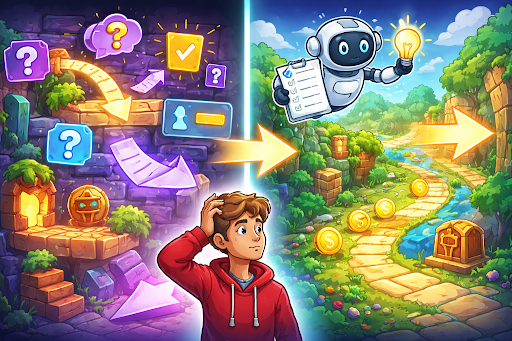
Many makers create exciting game ideas with AI tools only to discover that players feel lost and stop playing early. The game world looks interesting, but the actions feel unclear, goals stay hidden, and it is hard to know what to try next. This confusion turns a promising project into one that players abandon quickly. The solution is to make every part of the game easy to understand through clear design choices and careful testing. You do not need to remove the interesting parts. You only need to present them in a way that guides players naturally. This guide gives practical steps to remove confusion and help players enjoy your game from the first minute. Follow these methods, and your AI game will feel welcoming, logical, and fun instead of puzzling.
Why Confusion Ruins Good Games
Confusion breaks the flow of play and makes players feel stupid rather than skilled. When someone does not know which button to press or what the main goal is, they guess instead of having fun. Wrong guesses lead to frustration, and many players quit before they discover the enjoyable parts. AI viral games add extra risk because new levels or objects appear differently each time. If the rules feel different in every new area, players cannot build confidence. Clear games keep the same basic logic everywhere, so players learn once and then focus on mastering the challenge. Good clarity turns first-time players into regular fans. They understand the mechanics quickly, feel smart when they succeed, and want to keep playing to see more. Fixing confusion is one of the fastest ways to improve how your game feels overall.
Four Main Sources of Confusion in Games
Look for these four common problems that make games hard to follow.
- Unclear Goals: Players do not know exactly what they are trying to achieve or how to measure success.
- Weak Feedback: Actions produce little or no visible or sound response, so players wonder whether they did something right or wrong.
- Overloaded Screens: Too many moving parts, buttons, or messages appear at the same time, making it hard to focus on the important action.
- Sudden Changes: The game introduces new rules or controls without warning or practice time, leaving players unsure what changed.
Making Goals Easy to Understand
Every level or section should have one clear main goal that players can see at a glance. Place a simple text message or icon at the top of the screen that says what to do, such as reach the end, collect ten coins, or survive for sixty seconds. Keep the wording short and direct. Show progress toward the goal with a visible bar or counter that updates in real time. When the player gets close to winning, make the goal marker brighter or add a gentle sound to build excitement. In AI generated levels, repeat the same goal types with small variations rather than inventing completely new objectives each time. Consistent goals help players apply what they learned in previous sections to new areas without starting from zero.
Improving Feedback for Every Action
Strong feedback tells players immediately that their action had an effect. When a player taps a button, the button should change color or size for a moment. When an object is collected, it should disappear with a bright flash and a pleasant sound. Add small celebrations for success, such as rising score numbers or short particle effects. For mistakes, use gentle negative feedback like a quick red flash or a soft error sound instead of harsh penalties. This approach teaches without punishing. In generated content, make sure every common action has the same feedback style. If jumping always produces a certain sound and visual, players will recognize it even in brand new levels. Consistent feedback builds trust and reduces confusion across the entire game.
Four Practical Ways to Reduce Confusion
Use these four straightforward methods to make your own game much clearer for players.
- Simplify the First Level: Remove everything except the core mechanic and one clear goal, so new players can learn without distractions.
- Add Gentle Guidance: Use light arrows, glowing edges, or short pop-up tips that appear only when a player seems stuck for a few seconds.
- Limit On-Screen Elements: Keep only the most important buttons and information visible at any time and hide the rest until needed.
- Show Examples Before Asking: Let players watch a short animation of the correct action before they have to perform it themselves.
Simplifying Controls and Layout
Controls should feel natural and require as few buttons as possible. On computers, limit movement to arrow keys or WASD plus one or two action buttons. On phones, use large tap or swipe areas that are easy to reach with thumbs. Place controls in the same spot on every screen so players do not have to search for them. Make buttons big enough to tap easily and add a short delay before they can be pressed again to prevent accidental repeats. Arrange the play area so the most important action happens in the center of the screen, where eyes naturally look. Keep score, health, or timers in the corners where they stay visible but do not block the main view. Clean layouts help players focus on playing instead of figuring out the interface.
Guiding Players Through Generated Content
AI generated games can feel unpredictable if new areas introduce surprises without preparation. Solve this by using familiar patterns that appear in every generated section. For example, always place the goal at the far right, or always use the same color for collectible items. Add a short transition screen or animation when moving to a new generated area. During this moment, show a quick reminder of the main goal and controls. This small pause gives players time to adjust without breaking immersion. Test generated levels with new players to make sure the core rules remain easy to follow, even when the layout changes. If confusion appears often in new areas, simplify the generation rules or add more consistent visual hints.
Four Areas to Check During Testing
Test your game by focusing on these four important areas to catch any remaining confusion.
- First Three Minutes: Watch whether new players understand the main goal and controls within the opening moments.
- Learning Moments: Note any points where players hesitate, repeat failed actions, or ask what to do next.
- Generated Sections: Check if new areas feel familiar or if players have to relearn basic actions each time.
- Overall Flow: Make sure the game moves smoothly from one section to the next without sudden stops or unclear next steps.
Drawing Inspiration from a Real Game
A good example of clear and enjoyable gameplay appears in Ragdoll Slingshots, where simple controls and immediate feedback make every attempt fun and easy to understand. You can experience it on Astrocade. Notice how the core mechanic feels natural right away and how the game gently guides players through each new challenge. Apply the same attention to clarity when polishing your own AI game.
Using Visuals and Sounds to Teach
Pictures and sounds often explain mechanics better than words. Use bright colors to highlight interactive objects and dull colors for background elements. Add unique sounds for different actions so players learn through hearing as well as seeing. Keep visual style consistent across all generated content. If coins always sparkle with the same animation, players will recognize them instantly in any new level. These repeated cues build understanding without needing extra explanations.
Avoiding Over-Explanation
Too many tutorial messages can feel as confusing as too few. Show only one new idea at a time and remove the message as soon as the player succeeds. Let players practice each concept before introducing the next one. If a mechanic is truly complex, break it into smaller pieces taught across several short levels rather than explaining everything at once. This gradual approach respects the player’s attention and builds real understanding.
Wrapping Up
Your AI generated game stops feeling confusing when you make goals visible, add strong feedback for every action, simplify controls and layout, and guide players gently through new content. The steps in this guide help you create a clear experience that welcomes new players and keeps them engaged. Whether you build your games with Astrocade or other easy tools, focusing on clarity turns good ideas into games that players truly enjoy and understand. Test with beginners often, fix one issue at a time, and watch how much better the game feels with each improvement. Start today by playing the first few minutes of your game as if you have never seen it before. Note every moment of hesitation and make small changes to remove it. With steady attention to clarity, your game will guide players smoothly into the fun and give them the satisfying experience they deserve. Clear games create happy players who return often and share their enjoyment with others.